On November 19, Broadcom shipped VMSA-2026-0009, an emergency security update for VMware vCenter Server that closes CVE-2026-123890, an authentication bypass that Chinese-linked attackers had already been exploiting as a zero-day since September 2026. For roughly two months, any organization running an unpatched vCenter reachable on its network was exposed to an attacker who needed no password, no stolen credential, and no phishing click to take administrative control of the platform that runs its virtual machines.
That should land hard for every mid-market IT leader running VMware. vCenter is not just another server in the rack. It is the control plane for the entire virtual estate: the console that creates, powers off, snapshots, clones, migrates, and deletes the workloads your business depends on. A vCenter zero-day is not only a security incident but also a business continuity event, because whoever holds vCenter holds the keys to production.
This article breaks down what CVE-2026-123890 does, who is affected, why the two-month exploitation window matters more than the patch date, and the 72-hour plan we recommend to patch, hunt, and verify recoverability. It also explains why the organizations best positioned to absorb this event are the ones that treat the virtualization management plane as a crown-jewel asset rather than plumbing.
What the vCenter Zero-Day CVE-2026-123890 Actually Does
According to BleepingComputer’s reporting on the Broadcom advisory, the flaw lives in the VMware Directory Service inside vCenter Server. The directory service is the identity backbone of vCenter. It underpins the single sign-on domain that decides who is allowed to log in and what each identity is allowed to do. A weakness there is a weakness in the front door itself, not in a side window.
Broadcom describes the bug as allowing an unauthenticated attacker with network access to a vulnerable vCenter Server to bypass authentication and gain unauthorized access. Successful exploitation can give the attacker administrative access to vCenter and, with it, control over the virtual machines that server manages. Read that sentence twice. The attacker does not need a foothold account, a compromised administrator, or a user who clicked the wrong link. They need a network path.
Broadcom fixed the issue in VMSA-2026-0009, which also addresses four additional vulnerabilities affecting VMware SDDC Manager and VMware Tools for Windows. The scope statement in the advisory is unusually broad. As quoted by BleepingComputer, Broadcom states: “You are affected if you are running any version of VMware vCenter, SDDC Manager, or VMware Tools for Windows prior to the versions listed as ‘fixed’ in the VMSA.” The advisory continues that this includes vCenter and SDDC Manager deployed standalone and as part of VMware Cloud Foundation, VMware vSphere Foundation, VMware Telco Cloud Platform, and VMware Telco Cloud Infrastructure, as well as VMware Tools installed in Windows virtual machines.
Broadcom classifies the vCenter fix as an emergency update and urges organizations to install it as soon as possible. When a vendor uses that language about its own management platform, the correct internal response is a change-freeze exception and an executive-sponsored remediation window, not a ticket in next month’s maintenance queue.
Who Should Assume They Are in Scope
Based on the advisory language, the safe assumption is that you are affected until you prove otherwise. In practical terms, that covers:
- Any standalone vCenter Server instance running a version earlier than the fixed release listed in VMSA-2026-0009.
- vCenter and SDDC Manager deployed inside VMware Cloud Foundation or VMware vSphere Foundation.
- Telecommunications environments built on VMware Telco Cloud Platform or VMware Telco Cloud Infrastructure.
- Every Windows virtual machine running VMware Tools below the fixed version, which in most estates means nearly every Windows guest.
That last item deserves attention. VMware Tools is installed inside guest operating systems across the estate, so remediation reaches far past the infrastructure team and into server owners, application teams, and the change windows of individual workloads. A vCenter patch is one change. A VMware Tools rollout across hundreds of Windows servers is a program.
Why a vCenter Compromise Is a Business Continuity Event
Most security incidents start at the edge and work inward. An attacker phishes a user, lands on a workstation, escalates privileges, and moves laterally until something valuable comes into reach. Defenders get multiple chances to catch them along the way: email filtering, endpoint detection, identity alerts, network segmentation. A vCenter authentication bypass collapses that chain. The attacker starts at the center of the infrastructure, with the authority to act on every workload at once.
Consider what administrative vCenter access makes possible, using nothing more than legitimate platform features:
- Powering off or deleting production virtual machines across every cluster the server manages.
- Taking snapshots or clones of sensitive servers, such as domain controllers and database hosts, and copying the disk files out for offline credential and data extraction.
- Deploying new, attacker-controlled virtual machines that blend in with legitimate workloads and serve as persistent footholds.
- Changing roles, permissions, and network settings in ways that are hard to spot without a known-good baseline.
- Staging the hypervisor-level disruption that ransomware operators use to take down an entire environment in a single coordinated action.
None of these actions requires exotic malware. They use the same buttons your administrators click every day, which is exactly why they are difficult to detect with tools focused on endpoints. An agent running inside a guest operating system cannot see a snapshot being taken from the management plane, and it cannot stop its own virtual machine from being powered off beneath it.
This is where the business translation matters. For a typical mid-market organization, vCenter manages the ERP system, the file servers, the line-of-business databases, the domain controllers, and often the virtual desktops. Losing control of vCenter is not losing one server. It puts every revenue-generating and operations-critical workload at risk simultaneously, and it puts the recovery tooling at risk as well if that tooling lives inside the same administrative domain.
Whoever holds vCenter holds the keys to production. Treat the management plane as a crown-jewel asset, not plumbing.
The Blast Radius Extends Beyond vCenter
The reporting identifies the vCenter directory service flaw as the one exploited in the wild. The four companion vulnerabilities in SDDC Manager and VMware Tools for Windows still matter, because bundling them into one advisory means one coordinated patch cycle can close them all, while skipping any component leaves a documented gap that attackers can read about as easily as defenders can.
SDDC Manager is the lifecycle orchestration layer for VMware Cloud Foundation. It automates deployment, upgrades, and configuration across the software-defined data center stack. That makes it another high-value management component, and it means organizations on VMware Cloud Foundation should follow the update sequencing Broadcom specifies for their release rather than patching components ad hoc. Getting the order wrong in an orchestrated stack can create its own outage, which is a poor trade during a security emergency.
Two Months of Silent Exploitation Changes the Math
The patch date is the least important date in this story. The important date is September 2026, when, according to the reporting, Chinese-linked attackers began exploiting the flaw. By the time VMSA-2026-0009 shipped on November 19, the vulnerability had been in active use for roughly two months against organizations that had no patch available to apply.
That has two consequences. First, patching now closes the door but tells you nothing about whether someone already walked through it. A vCenter that was reachable and unpatched during that window needs to be investigated, not just updated. Second, espionage-focused operators generally prioritize stealth and persistence over speed. Their objective is often durable access and intelligence collection, which means the indicators may be subtle: an extra local account, an unexpected virtual machine, a snapshot no one remembers requesting, or authentication events at odd hours from unfamiliar sources.
Mid-market organizations sometimes assume they are not interesting enough for this class of attacker. That assumption is outdated. Mid-market firms are suppliers, subcontractors, service providers, and data custodians for larger organizations and government agencies. Access to your vCenter can be a means to someone else’s end, and you will bear the cost of the cleanup regardless of who the real target was.
The patch closes the door. Only an investigation tells you whether someone already walked through it.
The Hypervisor Layer Is a Proven Ransomware Target
If the espionage angle feels abstract, the ransomware history should not. Virtualization infrastructure has been a favored target precisely because it offers leverage. Disrupt the hypervisor layer and every virtual machine on it goes dark together. The February 2023 ESXiArgs campaign made that lesson vivid for organizations that had exposed VMware ESXi hosts to the internet.
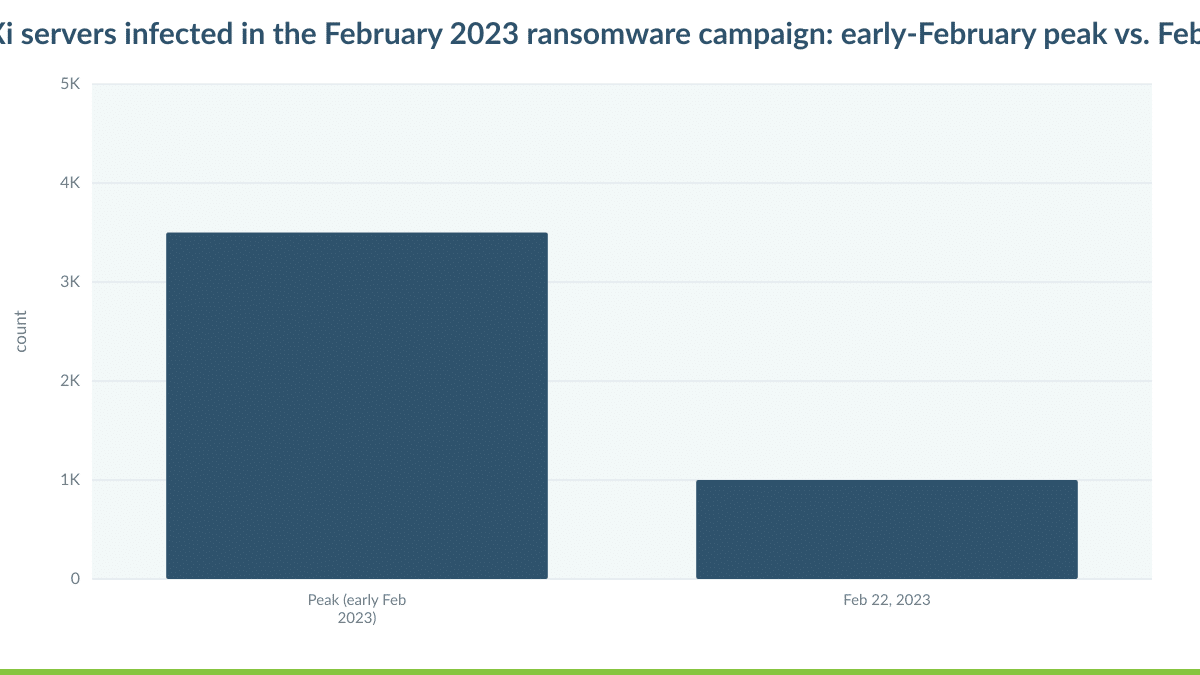
The chart above, drawn from Forescout’s analysis of VMware ESXi servers as a major attack vector for ransomware, compares the number of ESXi servers infected at the early-February peak of that campaign with the count on February 22. The decline reflects remediation, rebuilds, and servers pulled offline after the fact. The lesson for leaders is the shape of the curve: the damage arrived fast, and the cleanup came after the outage, not before it. Every server in that peak represented a business that discovered its exposure by losing access to its own workloads.
The industry did respond. Forescout’s research also tracked the number of internet-exposed ESXi servers over the following year.
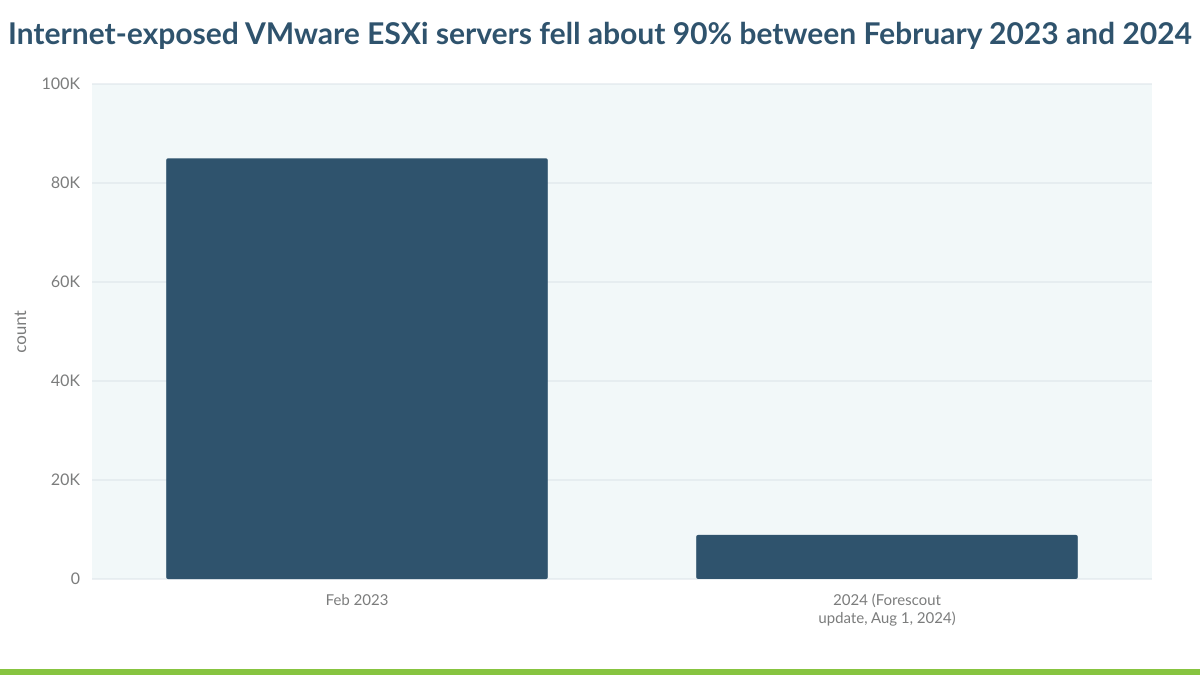
Internet-exposed ESXi servers fell about 90 percent between February 2023 and 2024, according to Forescout. That is genuine progress, and it proves that exposure reduction works when organizations commit to it. But CVE-2026-123890 is a reminder that internet exposure is only one form of network access. Broadcom’s description requires an attacker with network access to vCenter, and that access can come from a compromised VPN account, a flat internal network, a breached workstation, or a third-party support connection just as easily as from the open internet.
Taking vCenter off the public internet is necessary. It is not sufficient. The real question is how many network paths lead to your management plane, and whether each one is controlled, authenticated, and monitored.
Taking vCenter off the internet is necessary. It is not sufficient. Any network path to the management plane is an attack path.
A 72-Hour Response Plan for the vCenter Zero-Day
The plan below is built for a mid-market team running one or more vCenter instances, with or without VMware Cloud Foundation. It assumes limited staff and competing priorities, so it sequences work by risk reduction per hour invested. Adjust the timelines to your environment, but do not reorder the logic: restrict and patch first, investigate second, prove recoverability third.
Hours 0 to 24: Inventory, Restrict, and Patch
- Build a complete inventory of every vCenter Server, SDDC Manager, and VMware Cloud Foundation or vSphere Foundation instance, including lab, test, DR, and acquired-company environments that rarely appear on the asset register.
- Compare each instance against the fixed releases listed in VMSA-2026-0009 and flag every one that falls below them.
- Restrict network access to vCenter immediately. Limit management interfaces to a dedicated management network or to hardened jump hosts protected by multifactor authentication while patching is underway.
- Confirm you have a current, restorable file-based backup of each vCenter before you touch it.
- Apply the vCenter update as the top priority. In VMware Cloud Foundation environments, follow the sequencing Broadcom specifies for your release so that SDDC Manager and vCenter stay in a supported state.
- Schedule VMware Tools for Windows updates in prioritized waves, starting with domain controllers, internet-facing servers, and systems holding regulated data.
The reason vCenter comes first is simple. It is the component confirmed as exploited, and it is the one that grants control over everything else. VMware Tools updates matter, but they are a guest-level rollout that can take days or weeks to complete across a large estate. Do not let the size of the Tools program delay the single change that removes the most risk.
Hours 24 to 48: Hunt for Evidence of Prior Access

- Review vCenter and single sign-on authentication logs back to at least the start of September 2026 for logins from unfamiliar sources, unusual hours, or accounts that should be dormant.
- Audit local accounts, SSO users, groups, roles, and permissions against a known-good baseline, and flag anything that cannot be explained by a change record.
- List every virtual machine, snapshot, and clone created since September and reconcile each against approved requests.
- Look for downloads or exports of virtual disk files, new datastores, and new or modified network port groups.
- Rotate vCenter administrative credentials, service account passwords, and integration secrets after patching is complete, so that new credentials are not exposed to a still-vulnerable system.
Check your log retention before you start. If vCenter logs roll over quickly and are not forwarded to a central platform, the evidence from September may already be gone. That is a finding in itself, and it should change how you configure logging going forward.
If the hunt surfaces anything unexplained, escalate to formal incident response rather than quietly cleaning it up. Evidence preservation matters for cyber insurers, for regulators, and, depending on your sector, for disclosure obligations. Deleting a rogue account before you have documented it can destroy the very evidence that determines the scope of the breach.
Hours 48 to 72: Prove You Can Recover
- Confirm that backups of critical workloads live outside the vCenter administrative domain, so a compromised vCenter cannot delete, corrupt, or encrypt them.
- Verify that at least one backup copy is immutable or logically air-gapped.
- Run a full test restore of a tier-one application, not just a file-level spot check.
- Validate that your disaster recovery runbook does not depend on the production vCenter being available and trustworthy.
- Document results with timestamps and owners, because your next cyber insurance renewal and your next audit will ask for exactly this evidence.
This third phase is the one most teams skip, and it is the one that determines whether a future management-plane compromise is an inconvenience or a crisis. If your only recovery path runs through the same vCenter an attacker might control, you do not have a recovery path. You have a dependency. Our DR Failover Validation Plan Template gives you a structured way to test and document recovery independently of production infrastructure.
Mapping the vCenter Zero-Day Response to the Five Pillars
A zero-day response is easy to frame as a security exercise alone. That framing undersells it to the executive team and underfunds the fixes. Mapping the work to the five pillars IT Vortex uses with every client makes the business value visible.
- Security: Close the authentication bypass, shrink every network path to the management plane, enforce multifactor authentication on administrative access, and hunt for evidence of prior compromise. The goal is not only to remove this vulnerability but also to make the next management-plane flaw harder to reach.
- Resilience: Keep backups and replicas outside the production administrative domain, protect at least one copy with immutability, and test full application recovery on a schedule. Resilience is measured by what you can restore, not by what you have backed up.
- Simplification: Consolidate sprawling vCenter instances, retire forgotten lab environments, and standardize versions. Every extra vCenter is another patch target and another place for an attacker to hide. Fewer, well-governed instances reduce both risk and labor.
- Performance: Plan patch waves so critical workloads stay available. VMware Tools updates on Windows guests can require a reboot depending on the components changed, so coordinated scheduling protects application performance and user experience while the fleet is remediated.
- Flexibility: Maintain the ability to run critical workloads in a separate, trusted environment while you investigate or rebuild. Options are what turn a forced outage into a controlled failover.
Patch Velocity Is an Operating Model Problem
Most mid-market IT teams know what to do when an advisory like VMSA-2026-0009 drops. The gap is rarely knowledge. It is capacity and coordination. The same three or four engineers who maintain vCenter also run the help desk escalations, the Microsoft 365 tenant, the firewall changes, and the quarterly audit requests. An emergency patch lands on top of all of it.
Then the coordination burden compounds. vCenter maintenance needs a window. VMware Tools updates need sign-off from every application owner whose server might reboot. VMware Cloud Foundation environments need careful sequencing. The compromise hunt needs someone who knows what normal looks like in your logs. Each of those tasks is manageable on its own. Together, during a week that already had other plans, they stretch a lean team past its limit, and the risky parts quietly slip.
Hiring one more engineer does not fix this, because the problem is structural. The fix is to change who owns the management plane. When the virtualization control layer is operated by a provider whose core job is to secure and patch it, the emergency patch becomes routine work performed by specialists, and your internal team stays focused on the applications and users that differentiate your business.
How IT Vortex Reduces the Blast Radius
As a Premier Broadcom VCSP Partner, IT Vortex delivers VMware-powered managed cloud built for mid-market organizations that need enterprise-grade infrastructure without enterprise complexity. We act as integrator, architect, and advisor, which means we design the environment, operate it, and stay accountable for how it behaves on the worst day, not just the day it was sold.
With Cloud Hosting (IaaS), the virtualization management plane becomes our responsibility to secure, monitor, and patch. Your workloads run on VMware infrastructure you already understand, while the vCenter lifecycle, emergency advisories included, is handled by a team that does this every day. That removes the coordination scramble described above and keeps management interfaces off the networks your users and vendors touch.
Security as a Service (SECaaS) adds the detection layer that management-plane attacks demand. Drawing on partners including Fortinet, CrowdStrike, and Proofpoint, SECaaS combines network segmentation, endpoint protection, and email security with monitoring designed to surface the subtle signals, such as unexpected administrative logins or new accounts, that a stealthy operator leaves behind.
Backup as a Service (BaaS), built on Veeam, keeps protected copies of your data outside the production administrative domain, with immutability options that prevent a compromised vCenter or a ransomware operator from deleting your last good restore point. Backups that an attacker can reach are not a recovery plan.
Disaster Recovery (DRaaS) replicates critical workloads to a separate environment so you can fail over to trusted infrastructure while the production estate is investigated or rebuilt. That changes the business conversation entirely. Instead of choosing between keeping a possibly compromised environment online or shutting the company down, leadership gets a third option: keep operating on clean infrastructure while the incident response runs its course.
For organizations staying on premises, we also work alongside internal teams to run the 72-hour plan above, validate recovery, and build the documentation that auditors and insurers now expect. The aim is the same either way: a management plane that is patched quickly, watched closely, and never the single point of failure for the business.
Five Questions to Put to Your Team This Week
Executives do not need to read the advisory to drive the right response. They need to ask the right questions and expect specific answers.
- How many vCenter instances do we run, including lab, DR, and inherited environments, and are all of them patched to the fixed releases in VMSA-2026-0009?
- Which networks, users, and third parties can reach vCenter today, and why does each of them need that access?
- Have we reviewed vCenter activity back to September 2026, and do we retain enough log history to do so?
- If vCenter were compromised tomorrow, could we restore our most critical application without relying on it, and when did we last prove that?
- Who owns emergency patching of the management plane, and what happens when that person is on vacation?
Vague answers are useful too. They show exactly where the operating model needs to change before the next advisory, not after it.
The Management Plane Is the New Perimeter
CVE-2026-123890 will be patched in most environments within weeks. The pattern behind it will not go away. Attackers have learned that the fastest route to an entire business runs through the tools that manage it: the hypervisor, the directory service, the orchestration layer. A single flaw in that layer bypasses every control built around individual servers and endpoints, and a two-month zero-day window means defenders cannot rely on patch speed alone.
The organizations that come through this cleanly will not be the ones that patched fastest on November 20. They will be the ones that had already narrowed every path to vCenter, kept their recovery capability outside its reach, and assigned management-plane operations to people whose full-time job is defending it. That is the shift worth making now: stop treating vCenter as infrastructure plumbing and start governing it as the most privileged system in the company, because it is.
If you want a second set of eyes on your exposure, your patch status, or your recovery plan, schedule a working session with Lou Corriero, VP Cloud at IT Vortex. In one conversation, we will map where your management plane is reachable, where your recovery depends on it, and which changes remove the most risk first.