
On November 20, 2026, Microsoft concluded an investigation and told affected customers that attackers had obtained unauthorized read-only access to tenant-level metadata through a vulnerability in the Entra Connect Health API. The flaw had been live since July 23 and went undiscovered until November 9, according to BleepingComputer’s reporting on Microsoft’s security notification. That means organizations running hybrid identity spent more than three months exposed through a service built to watch over their identity infrastructure, not to weaken it.
The Microsoft Entra Connect Health breach is not a story about stolen passwords. Microsoft states that user passwords, password hashes, authentication tokens, and valid cryptographic keys were not exposed. It is a story about reconnaissance. Administrator email addresses and tenant configuration details are the raw material for the next, more targeted attack. For mid-market organizations whose entire operation runs on Microsoft 365 and a hybrid Active Directory, that is the part that deserves executive attention right now.
This article breaks down what happened, what was and was not exposed, why the incident fits a broader pattern in current breach data, and a practical 72-hour plan to reduce risk. It also explains where a managed security and recovery partner changes the math, not only for this incident but also for the next identity-layer event that will follow it.
What Happened in the Microsoft Entra Connect Health Breach
Microsoft Entra Connect Health is a cloud-based monitoring service that allows administrators to monitor the health, performance, and alerts of their on-premises identity infrastructure through the Microsoft Entra admin center. In practice, it is the agent-based service that reports on the servers that make hybrid identity work: Microsoft Entra Connect synchronization servers, Active Directory Federation Services (AD FS) farms, and Active Directory domain controllers. It sits precisely at the seam between the on-premises directory and the cloud tenant, which is why a flaw in its API matters far more than its modest role in the admin console would suggest.
According to a security notification Microsoft sent to administrators, which was subsequently shared on Reddit, the company discovered the vulnerability in the Entra Connect Health API on November 9, 2026, after it was first introduced on July 23. Microsoft’s investigation determined the flaw was exploited, allowing unauthorized parties to access tenant and service-monitoring metadata and potentially modify Connect Health monitoring configurations.
Microsoft’s notification stated: “On 20 November 2026, we concluded our investigation and determined that unauthorized read-only access to tenant-level metadata associated with your organization had occurred. We did not identify any unauthorized configuration changes.” That second sentence is welcome news. The first sentence is the one security leaders should plan around.
The Timeline at a Glance
- July 23, 2026: The vulnerability is introduced into the Entra Connect Health API.
- November 9, 2026: Microsoft discovers the vulnerability.
- November 20, 2026: Microsoft concludes its investigation, confirming unauthorized read-only access to tenant-level metadata and no identified configuration changes.
- Following the investigation: Microsoft notifies affected tenant administrators directly.
The gap between introduction and discovery is the figure to sit with. For more than three months, a cloud service with visibility into your identity infrastructure was answering requests it should have refused. No amount of internal patching discipline would have closed that window, because the vulnerable code was not running in your data center. It was running in Microsoft’s. That reality reshapes how mid-market IT leaders should think about shared responsibility in a hybrid identity model.
What Was Exposed, and What Was Not
Microsoft says the incident gave attackers unauthorized access to administrator email addresses and tenant configuration information. One detail in the disclosure stands out above the rest: an expired certificate that was no longer in use remained in Connect Health storage and was still returned by the API. The certificate was retired from service, yet it was never removed from the system that held it.
On the other side of the ledger, Microsoft states that the vulnerability did not expose user passwords, password hashes, authentication tokens, or valid cryptographic keys. That boundary is meaningful. Attackers did not walk away with credentials they could replay, and they did not obtain a signing key capable of forging tokens. Organizations should take that assurance at face value while recognizing what it does not cover: the identities of the people who administer the tenant and the shape of the environment those people manage.
The expired certificate deserves a second look because it mirrors a problem that exists in nearly every mid-market environment. Decommissioned is not the same as deleted. Old certificates sit in stores long after their expiry. Service principals created for a long-finished project keep their permissions. App registrations from a proof of concept linger in the tenant. Former administrators keep accounts that nobody remembers to disable. Each artifact is harmless until something exposes it, at which point it becomes either an attack path or, at minimum, a free source of intelligence for an adversary.
Why Read-Only Metadata Still Creates Business Risk
“Read-only” and “metadata” are reassuring words in a press notification. In an attacker’s playbook, they describe the reconnaissance phase. Metadata is a map. It tells an adversary who holds administrative power, how the hybrid identity architecture is assembled, and where the trust relationships between on-premises and cloud live. Depending on the specific fields returned, tenant configuration information can reveal enough about an environment to make every subsequent step faster and more convincing.
Consider how that intelligence translates into operational attacks:
- Targeted phishing of named administrators. Generic phishing hits everyone and hopes. An attacker with a verified list of tenant administrator addresses can craft lures that reference real Microsoft services, real alert formats, and even real monitoring configurations.
- Help desk social engineering. Knowing exactly which accounts hold privileged roles lets an attacker call the help desk impersonating the right person, armed with plausible details about the environment.
- Attack path selection. Understanding whether a tenant relies on federation, synchronization, or both helps an adversary decide whether to target AD FS servers, sync servers, or cloud-only administrator accounts.
- Credibility for fraud. Business email compromise succeeds on believable detail. Tenant-specific information gives fraudulent messages the authenticity that bypasses human skepticism.
The business stakes are concrete. A compromised global administrator account in a Microsoft 365 tenant can lead to mailbox-wide data theft, fraudulent wire transfers, disabled security controls, and, in the worst cases, ransomware staged across every synchronized endpoint. For a mid-market firm, that is not an IT inconvenience. It is a continuity event that touches revenue, regulatory standing, cyber insurance coverage, and customer trust in the same week.
An attacker who knows exactly which humans hold the keys to your tenant no longer needs to guess where to aim.
The Pattern Behind the Headline: Credentials, Vulnerabilities, and Third Parties
The Entra Connect Health incident is not an outlier. It is a textbook example of two forces that dominate current breach data: attackers exploiting vulnerabilities in widely deployed services, and attackers abusing identity once they have enough information to target it. The Verizon 2025 Data Breach Investigations Report tracks how breaches begin, and the leading initial access vectors tell a consistent story.
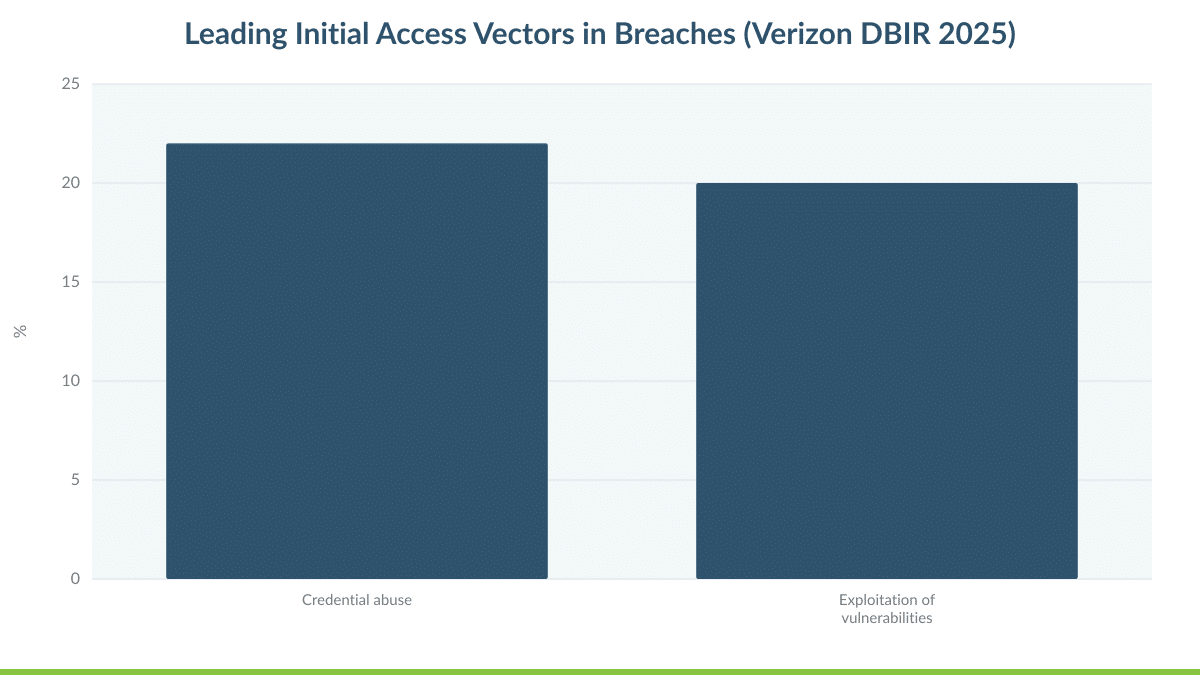
As the chart drawn from the Verizon 2025 DBIR shows, credential abuse, exploitation of vulnerabilities, and phishing sit at the top of the initial access rankings. The Entra Connect Health incident touches all three. A vulnerability in a cloud API provided the opening. The data it leaked, administrator identities and tenant configuration, is exactly what fuels the phishing and credential abuse that drive so many breaches. In other words, this event is the first link in a chain that the breach data says attackers complete regularly.
The second force is third-party exposure. Every organization running Microsoft Entra Connect Health depends on Microsoft’s code, Microsoft’s storage, and Microsoft’s API security. None of that is under the customer’s direct control. Analysis of the Verizon 2025 DBIR by Beyond Identity highlights how the share of breaches involving a third party has climbed year over year.
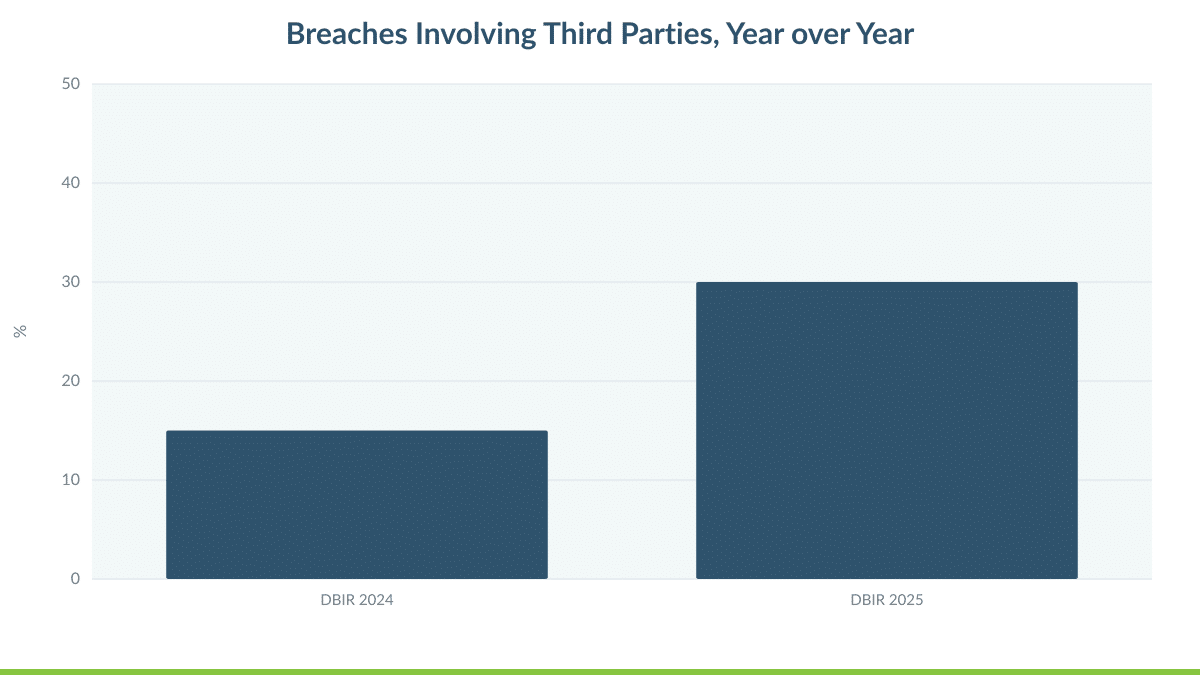
The upward trend in third-party involvement shown above reflects how modern IT actually operates. Mid-market organizations run on software-as-a-service platforms, managed monitoring tools, cloud identity providers, and integration connectors. Each one extends the attack surface into infrastructure the organization does not own. Entra Connect Health is a third-party service in the purest sense: you did not write it, you cannot patch it, and you inherit its flaws the moment you install the agent. Vendor risk management can no longer stop at a questionnaire. It has to include compensating controls that assume a trusted vendor will, at some point, be the source of exposure.
Identity Is the Perimeter, and Attackers Know It
For years, security architecture centered on the network edge. That model has given way to identity as the true control plane. Whoever controls the identity system controls access to email, files, applications, and infrastructure. Microsoft’s own threat intelligence reinforces where attackers concentrate their effort. The Microsoft Digital Defense Report 2025, as summarized by SOCRadar, breaks identity attacks down by technique.
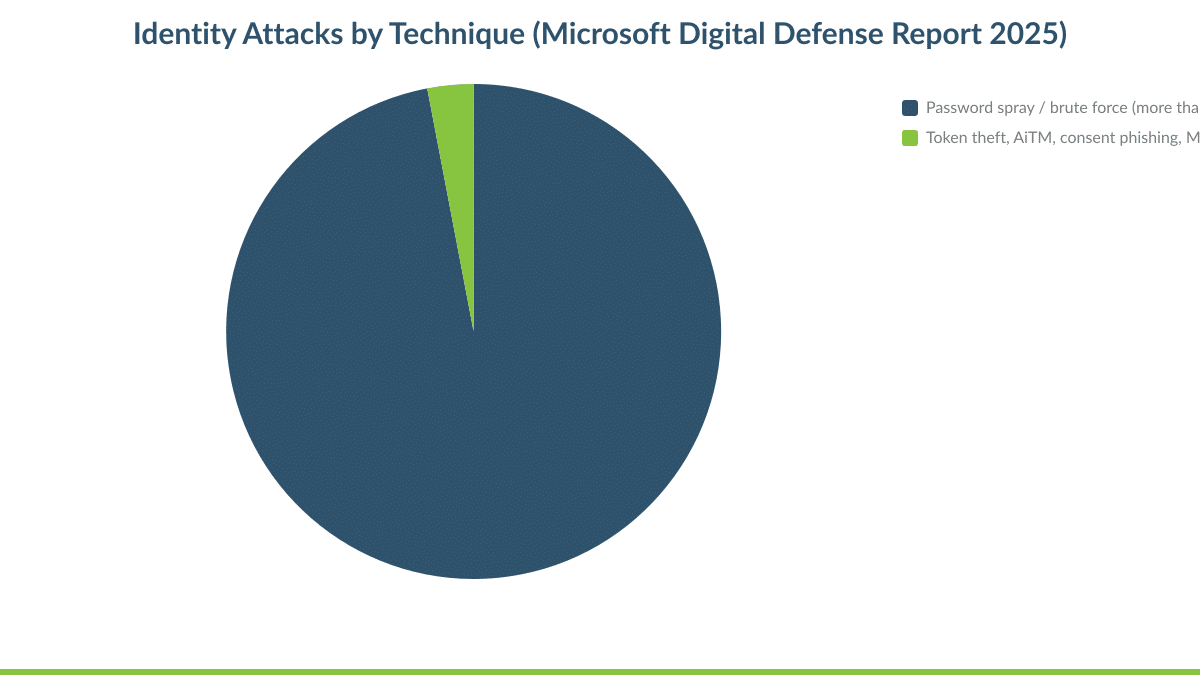
The distribution in the Microsoft Digital Defense Report 2025 data is stark: password-based techniques account for the overwhelming majority of identity attacks, with phishing and other methods making up the remainder. That finding connects directly to the Entra Connect Health exposure. Password spray and phishing campaigns are far more effective when the attacker starts with a confirmed list of privileged email addresses rather than a guessed one. A leak of administrator contact information effectively hands an adversary a curated target list for the technique that already dominates identity attacks.
The defensive implication is equally clear. If passwords are the primary attack surface, privileged accounts must not depend on passwords alone, and ideally should not depend on factors that can be phished at all. Phishing-resistant authentication, such as FIDO2 security keys, Windows Hello for Business, and certificate-based authentication, removes the payoff from the very attacks this leaked data makes easier. Organizations that have already enforced phishing-resistant MFA for administrators face a materially lower risk from this incident than those still relying on SMS codes or push approvals.
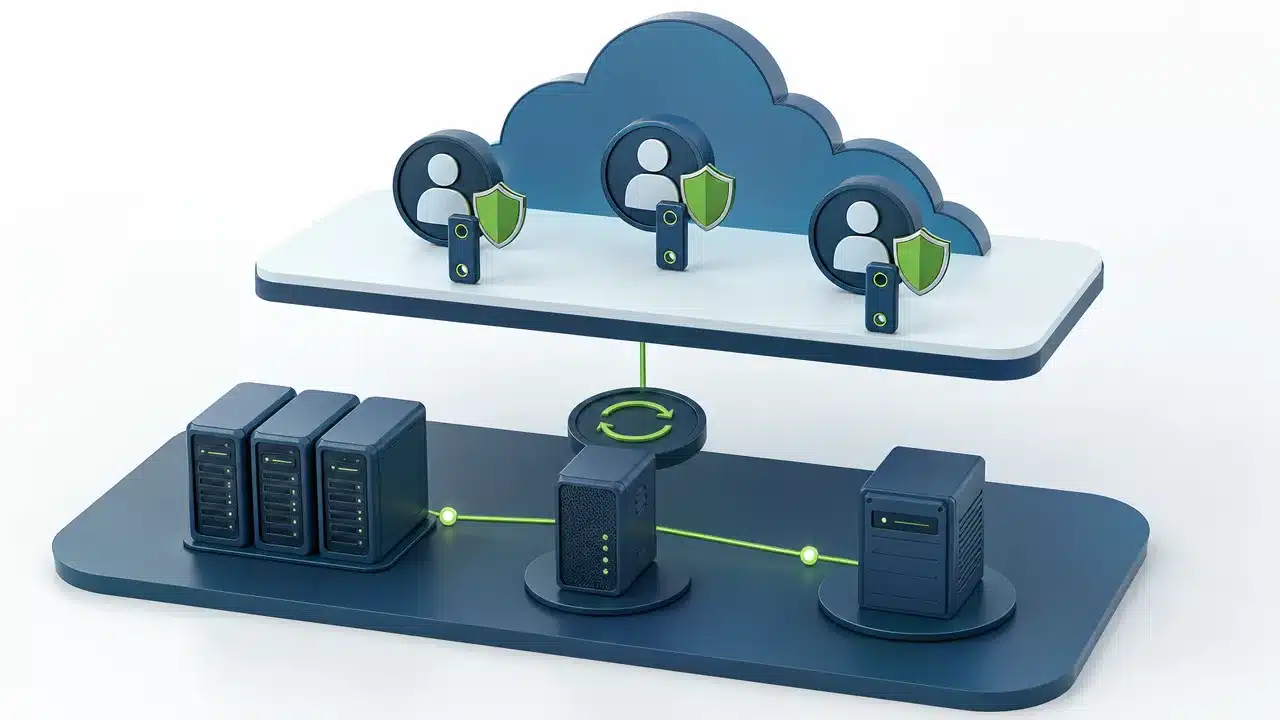
Your identity layer is now a supply chain. You inherit every flaw in every service that touches it, whether you wrote the code or not.
A 72-Hour Microsoft Entra Connect Health Breach Response Plan
Microsoft has addressed the vulnerability on its side. Your side of the response is about scoping exposure, removing the advantage the leaked data provides, and confirming you can recover if a follow-on attack succeeds. The following plan is designed for a lean mid-market IT team and can be executed in three focused days.
Hours 0 to 24: Confirm Exposure and Establish Scope
- Check for the notification. Review the inboxes of every global administrator and the Microsoft 365 Message center for Microsoft’s security notification. If your tenant received it, treat the incident as confirmed exposure.
- Inventory Connect Health usage. Identify every Connect Health agent in your environment, including those on Entra Connect sync servers, AD FS servers, and domain controllers. Agents installed years ago by former staff or consultants are common.
- List every exposed administrator address. Include named admins, shared administrative mailboxes, and any distribution lists configured to receive Connect Health alerts.
- Review sign-in and audit logs. Examine Entra ID sign-in logs and audit logs for privileged accounts, looking for unfamiliar locations, failed sign-in bursts consistent with password spray, unexpected MFA registrations, and new consent grants.
- Verify monitoring configuration. Microsoft did not identify unauthorized configuration changes, but confirm independently that Connect Health alert recipients and notification settings match what your team expects.
Hours 24 to 48: Harden the People Attackers Can Now Name
- Enforce phishing-resistant MFA for privileged roles. Use Conditional Access authentication strengths to require FIDO2 keys, Windows Hello for Business, or certificate-based authentication for every administrative role.
- Eliminate standing privilege. Move global administrator and other high-impact roles to just-in-time activation through Privileged Identity Management, so a compromised account does not carry permanent power.
- Separate administrative and daily accounts. Administrators should not read email, browse the web, or join meetings with the same account that holds tenant-wide privileges.
- Brief administrators and the help desk. Warn exposed administrators to expect convincing, Microsoft-themed lures. Require the help desk to verify identity through an out-of-band method before any password reset or MFA change on a privileged account.
- Secure break-glass accounts. Confirm emergency access accounts are excluded from policies only where necessary, protected with strong phishing-resistant credentials, stored securely, and monitored with alerts on every sign-in.
Hours 48 to 72: Clean Up Artifacts and Validate Recovery
- Hunt for lingering artifacts. Audit expired and unused certificates, stale app registrations, orphaned service principals, and dormant administrator accounts. Remove what is not needed. The expired certificate in this incident is a reminder that retired assets still leak.
- Treat hybrid identity servers as Tier 0. Entra Connect sync servers and AD FS servers deserve the same protection as domain controllers: restricted administrative access, hardened builds, and dedicated monitoring.
- Confirm identity-aware backups. Verify you hold immutable, recent backups of Microsoft 365 data, Entra ID configuration, and on-premises Active Directory.
- Test the recovery, not just the backup. Validate that you can restore Active Directory and bring dependent applications back online in a documented sequence and within a known time.
That final step is where many mid-market organizations discover a gap. Backups exist, but nobody has rehearsed a full identity recovery. A service like Backup as a Service (BaaS) built on Veeam provides immutable copies of Microsoft 365 and infrastructure data, while Disaster Recovery (DRaaS) turns those copies into a tested, orchestrated path back to operations. Together they convert an identity compromise from an open-ended crisis into a bounded recovery exercise.
Mapping the Response to the Five Pillars
Incidents like this one are useful stress tests for an IT strategy. Each of the five pillars that guide how IT Vortex architects environments maps directly to a lesson from the Entra Connect Health exposure.
- Security: Assume that administrator identities are known to adversaries. Design controls, including phishing-resistant MFA, just-in-time privilege, and continuous identity monitoring, so that knowledge alone does not grant access.
- Resilience: Plan for the day a follow-on attack succeeds. Immutable backups and rehearsed recovery runbooks determine whether a compromise costs hours or weeks.
- Simplification: Every unused certificate, stale service principal, and forgotten agent adds risk without adding value. Reducing sprawl shrinks the surface that any vendor flaw can expose.
- Performance: Identity outages stop the business. Hardened, well-monitored hybrid identity infrastructure keeps authentication fast and available for every user and application that depends on it.
- Flexibility: Hybrid identity is a choice, not a mandate. Evaluating whether federation or on-premises dependencies still serve the business can open a path to a cleaner architecture with fewer moving parts.
That last point is worth expanding. Many mid-market organizations still run AD FS and complex synchronization topologies because they were the right answer a decade ago. Each additional component is another system to monitor, patch, and defend, and another integration point for services like Connect Health. A thoughtful review of hybrid cloud architecture often reveals opportunities to retire legacy identity components, simplify trust relationships, and reduce the number of places where a single vendor flaw can matter.
The Governance Conversation: Disclosure, Insurance, and the Board
A vendor-side breach still creates customer-side obligations. Boards and executive teams will ask three questions: Were we affected? What did we do about it? Could it happen again? IT leaders who can answer all three with evidence, such as log reviews, policy changes, and recovery test results, turn an uncomfortable meeting into a demonstration of control.
Public companies face an additional layer. The SEC’s cybersecurity disclosure rules require a materiality determination when an incident occurs, and a third-party breach that touches tenant data warrants at least a documented assessment. The SEC 8-K Disclosure Readiness Checklist provides a structured way to confirm your team can make and document that determination quickly, rather than improvising under deadline pressure.
Cyber insurance is the other governance lever. Carriers routinely scrutinize how organizations protect privileged access, and MFA requirements for administrative accounts are a standard underwriting topic. An incident that exposes administrator identities is exactly the scenario those questions anticipate. Organizations that can show phishing-resistant MFA, privileged access controls, and tested backups are better positioned not only at renewal but also when a claim is filed and the carrier reviews whether stated controls were actually in place.
Vendor risk programs also need an update. The Entra Connect Health incident shows that even the largest providers ship flaws that persist for months. Contract reviews and security questionnaires remain useful, but they should be paired with a simple principle: for every critical third-party service, document what you would do if that service were the source of exposure tomorrow. That exercise surfaces compensating controls before you need them.
Where IT Vortex Fits
Mid-market IT teams rarely lack awareness. They lack hours. A 72-hour response plan competes with ticket queues, project deadlines, and the daily work of keeping the business running. That is where an integrator and advisor, not a reseller, earns its place. As a Premier Broadcom VCSP Partner, IT Vortex architects and operates enterprise-grade infrastructure without enterprise complexity, and identity security is woven through every layer of that work.
Security as a Service (SECaaS) brings together protection from partners including Fortinet, CrowdStrike, and Proofpoint, giving mid-market organizations layered defenses against the phishing, credential abuse, and endpoint attacks that typically follow an exposure like this one. Proofpoint email protection addresses the targeted lures that leaked administrator addresses invite. CrowdStrike endpoint detection watches for the hands-on-keyboard activity that follows a successful credential theft. Fortinet secures the network paths between users, servers, and cloud services.
Beyond point protection, Managed Services provide the operational capacity to execute plans like the one above: auditing tenants for stale artifacts, enforcing Conditional Access policies, reviewing privileged role assignments, and keeping hybrid identity servers hardened over time rather than only in the week after a headline. Combined with Backup as a Service (BaaS) and Disaster Recovery (DRaaS), the result is a security posture designed to absorb a vendor flaw rather than be defined by one.
Lou Corriero, VP Cloud at IT Vortex, works directly with IT leaders to assess where their identity architecture, backup coverage, and recovery readiness stand today, and where the gaps sit relative to incidents like this one. Those conversations start with your environment, not a product catalog.
The Real Question Is Not Whether Microsoft Fixed Its API
Microsoft found the flaw, investigated it, and notified customers. That is how the process is supposed to work, and the company deserves credit for transparent disclosure. Yet the vulnerability will not be the last of its kind. Cloud services that touch identity infrastructure will continue to ship code, and some of that code will contain mistakes that persist longer than anyone would like.
The question that matters for your organization is different. It is not “Did Microsoft fix the API?” It is “What does it cost an attacker to succeed against us when they already know our administrators’ names and our tenant’s shape?” If the answer is a single phished password, the exposure is serious. If the answer is a hardware security key they cannot steal, a privileged role that does not exist until it is activated, and an immutable backup that restores operations on a rehearsed timeline, the leaked metadata loses most of its value.
You cannot control when a trusted vendor leaks your metadata. You can control whether that metadata is worth anything to the attacker who holds it.
Recast the Entra Connect Health incident as a free rehearsal. It identified your administrators, tested your notification process, and exposed whether your recovery plan has ever been exercised. Organizations that use the next 72 hours to close those gaps will face the next identity-layer event from a position of strength. Organizations that file the notification and move on are betting the next one will be read-only too.
If you want a second set of eyes on your hybrid identity exposure, privileged access controls, and recovery readiness, schedule a working session with Lou Corriero, VP Cloud at IT Vortex. You will leave with a prioritized list of actions mapped to your environment, whether or not you ever engage IT Vortex further.