Mandiant’s M-Trends data shows the global median attacker dwell time deteriorating from 11 to 14 days, as analyzed on the TaoSecurity Blog. At the same time, CrowdStrike’s Global Threat Report continues to measure eCrime breakout time, the interval between an intruder’s first foothold and their first lateral move, in minutes rather than hours. Put those two measurements side by side and the problem is obvious: attackers move faster than ever, while many defenders take longer to notice them.
CSO Online addressed that gap on November 9, 2026, when contributing writer John Edwards published 7 tips for achieving defensive agility. The piece defines defensive security agility as an organization’s potential to rapidly detect, adapt, and respond to evolving cyber threats and vulnerabilities without disrupting core operations. It argues for abandoning static, rigid defense architectures in favor of continuous iteration, automation, and cross-functional flexibility.
For US mid-market IT leaders, that definition has direct practical consequences. You defend much of the same attack surface as a large enterprise: remote users, SaaS sprawl, internet-facing firewalls and VPNs, a virtualization estate, and backups that ransomware crews deliberately target. You do it with a fraction of the headcount. Defensive agility is how a lean team narrows the gap between attacker speed and defender speed without hiring a twenty-person security operations center. The seven tips below each map to business impact and to the IT Vortex pillars of Simplification, Security, Performance, Resilience, and Flexibility.
What Defensive Agility Actually Means for Mid-Market IT
Most security programs were built as static structures: a firewall at the edge, antivirus on the endpoint, a nightly backup job, and an annual penetration test. Each control is reasonable on its own. The weakness is that the program as a whole changes slowly, typically once a year at budget time, while the threat environment changes weekly. Defensive agility replaces that annual cadence with a continuous loop. You detect, decide, act, recover, learn, and adjust, and then you run the loop again.
Anant Adya, an executive vice president at Infosys, framed the stakes clearly in the CSO Online feature: “As attack surfaces expand, organizations must prioritize risk quantification and identify vulnerabilities to strengthen their security posture and improve their ability to recover from attacks that are inevitable.” The last word of that sentence carries the most weight. Agility does not assume you will stop every intrusion. It assumes some will succeed, and it makes sure the business keeps running when they do.
That shift has direct business consequences. An agile defense not only reduces the probability of a damaging breach but also shortens the duration of the breaches that get through. Duration is where the cost lives. It shows up as lost revenue during downtime, overtime for recovery, regulatory notification windows, and the reputational damage of being offline when clients need you. The seven tips below follow the order in which an attack unfolds. They start with preventing initial access, move through detection and containment to clean recovery, and finish with the lessons that make the next response faster.
Tip 1: Begin With Zero Trust and Keep Tightening It
The CSO Online feature states that achieving defensive agility should begin with a zero-trust approach, and that order is correct. Agility depends on knowing who and what is allowed to talk to what. Without that baseline, every response decision becomes a guess, and guesses take time that an incident does not give you.
For a mid-market organization, zero trust comes down to a handful of concrete moves:
- Make identity the primary perimeter. Enforce phishing-resistant multifactor authentication on every administrative account and every remote access path. Use conditional access policies in Microsoft Entra ID to block sign-ins from unmanaged devices or unexpected locations.
- Separate administrative identities. Domain administrators, hypervisor administrators, and backup administrators should use different accounts, ideally in different identity domains. One stolen credential should never reach production, the virtualization layer, and the recovery copies all at once.
- Segment east-west traffic. Microsegmentation with VMware NSX, or segmentation policies enforced on Fortinet FortiGate firewalls, limits what a compromised workload can reach. It turns a network-wide incident into a contained one.
- Remove standing privilege. Grant elevated rights just in time and for a defined window. An attacker who lands on a workstation should not inherit permanent admin access.
- Treat devices as untrusted until proven otherwise. Virtual desktops delivered through Omnissa Horizon keep corporate data in the data center rather than on unmanaged laptops. That narrows the endpoint attack surface considerably.
The business case is a smaller blast radius. When identity and segmentation are tight, an incident that would have encrypted every file server stays confined to a single subnet or a single user session. That is the Security pillar in action. It also delivers Simplification, because a well-segmented environment is far easier to reason about during an incident than a flat network where everything trusts everything else.
Zero trust is a direction rather than a destination. Review access policies quarterly. Retire accounts the day an employee or contractor leaves. Treat every exception you grant as a debt with a due date, and collect on it.
Tip 2: Quantify Risk in Business Terms Before You Spend
Adya’s emphasis on risk quantification is the tip organizations skip most often. Skipping it is a major reason security budgets feel arbitrary to the board. You cannot move quickly in a crisis if you have not decided in advance what matters most, so agility requires a ranked list.
Start by identifying the systems whose outage stops revenue or starts a regulatory clock. These might be the ERP platform, the electronic health record, the practice management system, the trading platform, or the file shares that hold client work product. For each one, document three numbers your own finance team can stand behind:
- The hourly cost of downtime.
- The maximum tolerable outage, which is your recovery time objective.
- The maximum tolerable data loss, which is your recovery point objective.
Do not borrow industry averages for this exercise. Numbers built from your own revenue and your own contracts carry far more weight with leadership than any survey.
With that ranking in hand, every later decision gets faster. Which alerts get a human at 2 a.m.? The ones touching tier-one systems. Which vulnerabilities get patched this week rather than this quarter? The ones on systems at the top of the downtime cost list. Which workloads get the tightest recovery objectives and the most frequent immutable backups? The same list. Risk quantification makes the remaining six tips decisive rather than debatable.
It also changes the conversation with cyber insurers and auditors. Underwriters ask detailed questions about how quickly you can detect, contain, and recover. An organization that answers in hours, backed by tested evidence, negotiates from a stronger position than one that answers with a list of products it owns. The ranked list belongs to the Simplification pillar, because it replaces endless prioritization meetings with a shared reference point that everyone, from the service desk to the CFO, can apply.
Tip 3: Compress Detection Before Dwell Time Compounds
The dwell-time trend is the clearest sign that detection is where most organizations lose ground. The TaoSecurity Blog’s analysis of Mandiant M-Trends data shows the global median dwell time deteriorating from 11 to 14 days. Those fourteen days are rarely quiet. Attackers use them for reconnaissance, credential harvesting, and privilege escalation. In ransomware cases, they also map the backup infrastructure before the encryption starts.
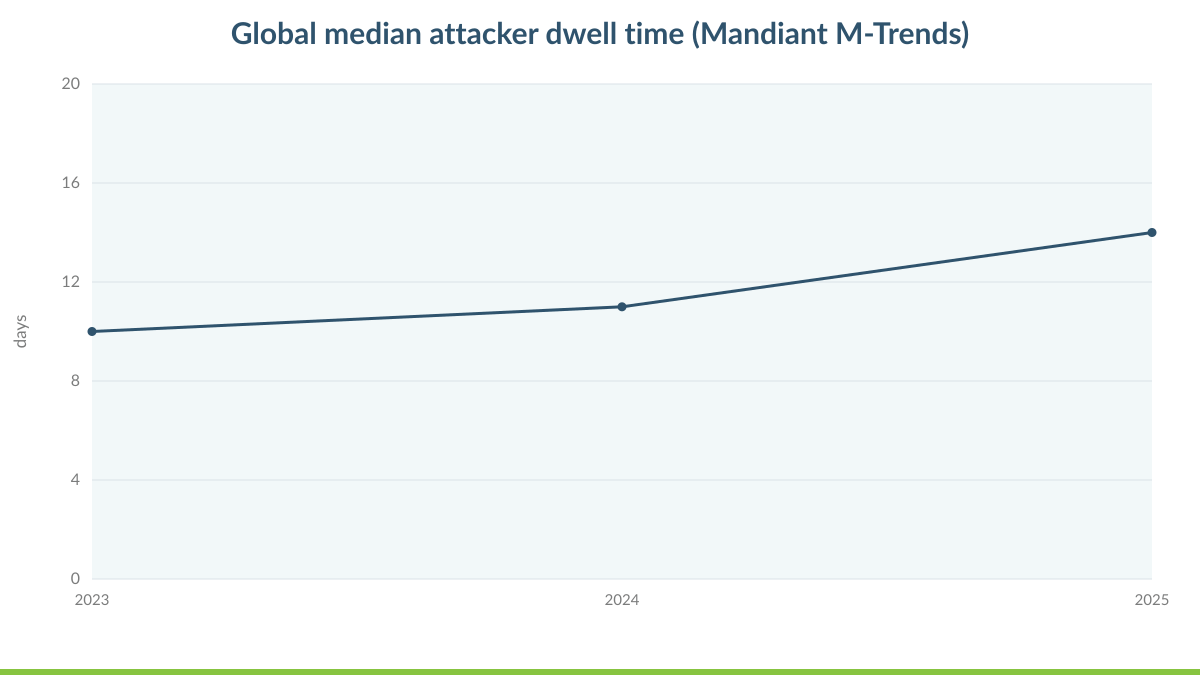
Read the line in this Mandiant M-Trends chart as a measure of how long defenders are effectively blind. Every day on that line is a day an intruder can use to make the eventual incident worse. The defensive-agility response is not another dashboard. It is a shorter interval between the first suspicious signal and a qualified human looking at it.
Three capabilities do most of the work:
- Endpoint detection and response on every server and workstation. A platform such as CrowdStrike Falcon surfaces behavioral indicators even when no known malware signature exists.
- Centralized log collection. Pull logs from identity providers, firewalls, hypervisors, and backup consoles. The earliest signs of an intrusion often appear where endpoint tools do not look, such as an unusual vCenter login or a backup job deleted outside a change window.
- Round-the-clock monitoring. Analysts need to know your environment well enough to tell a scheduled admin task from an attacker living off the land.
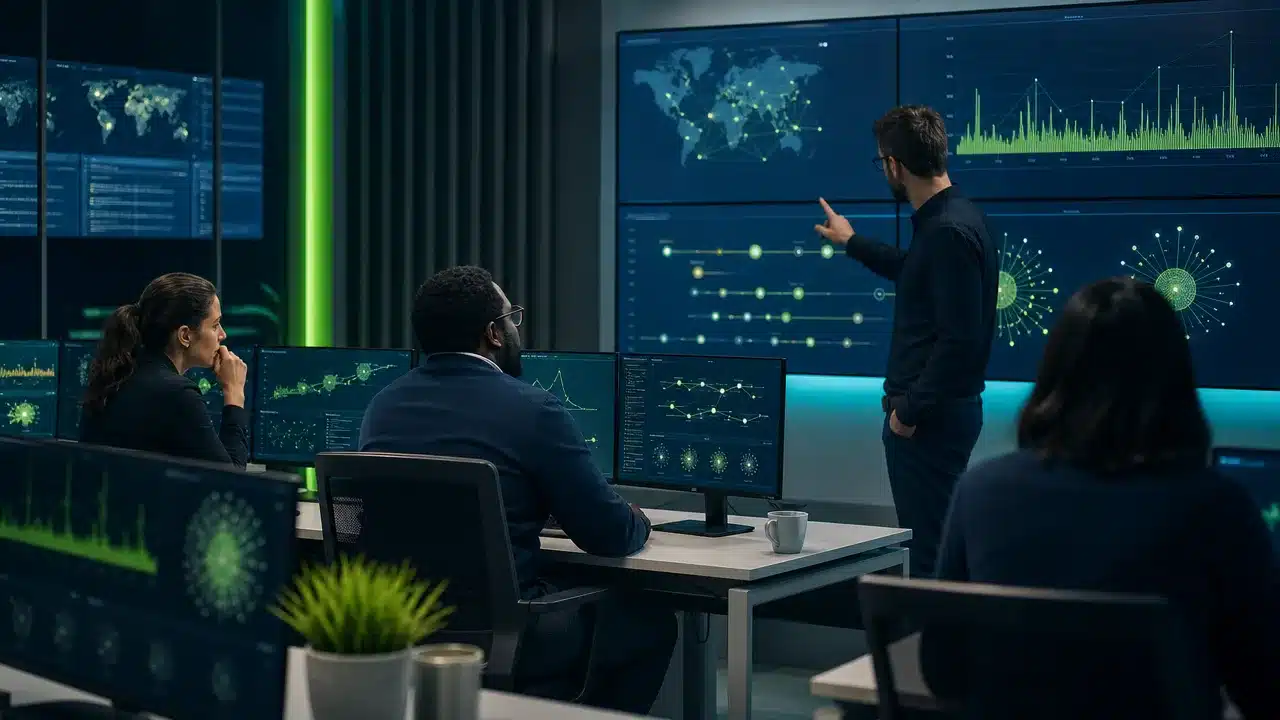
Round-the-clock monitoring is the capability mid-market teams struggle most to staff. Alert volume is the enemy of detection speed. When analysts face a flood of low-fidelity alerts, real signals wait in the queue behind noise. The Alert Triage Benchmark Report lays out the triage metrics worth tracking and how they shape response.
Some organizations cannot staff a 24×7 security operations function internally. For them, Security as a Service (SECaaS) from IT Vortex pairs managed detection with tuned alerting, so your team receives fewer and better escalations. That is the Performance pillar applied to security: faster signal, less noise, and analysts who spend their time on investigations rather than false positives.
Tip 4: Automate the First Moves of Every Response
Detection only buys time if response follows quickly, and the breakout data shows how little time there is. CrowdStrike’s Global Threat Report, as compiled by Swif.ai, tracks average eCrime breakout time. That is how long an adversary takes to move from the first compromised host to other systems in the environment.
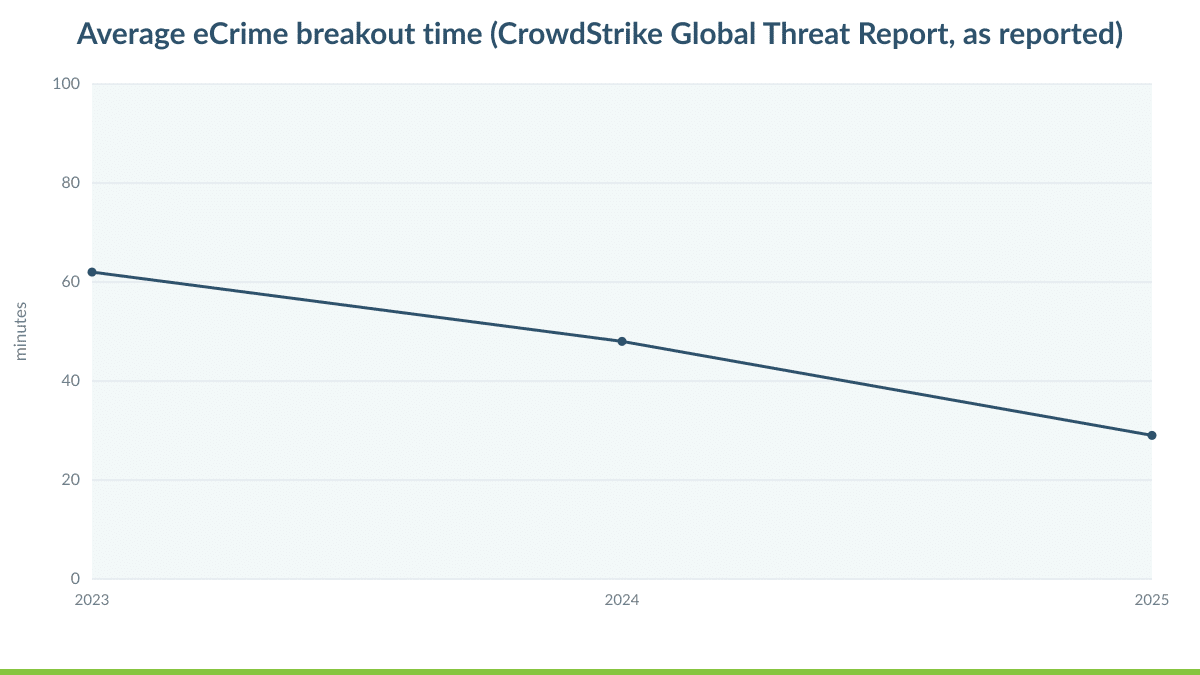
The key detail in this chart is the unit of measure: breakout is counted in minutes. Compare that with a typical manual escalation path:
- An alert fires and the on-call engineer is paged.
- The engineer logs in and gathers context.
- The engineer calls a manager for approval to isolate a production server.
- Everyone waits for a callback.
Even a well-run team can spend a long time on that sequence. The attacker may move on before anyone takes the first containment action.
Defensive agility means deciding in advance which actions can happen automatically, with guardrails, and which require human judgment. Strong candidates for automation include:
- Isolating an endpoint from the network when EDR detects high-confidence ransomware or credential-dumping behavior, while keeping its connection to the security console for investigation.
- Disabling, or forcing reauthentication on, a user account that shows impossible-travel sign-ins or a sudden burst of mass file access.
- Pushing indicators of compromise, such as malicious IP addresses and domains, to Fortinet FortiGate firewalls and to email security platforms like Proofpoint, so the same campaign cannot reach a second user.
- Revoking active sessions and tokens for compromised cloud identities in Microsoft 365.
- Placing backup repositories in a read-only state when production systems show suspicious deletion or encryption activity.
Write each playbook, get leadership approval, and test it before an incident rather than improvising during one. The approval itself is a business conversation. Leadership agrees, for example, that isolating a single workstation for an hour is an acceptable cost compared with the alternative. Once that decision is made in daylight, nobody has to make it at 3 a.m. under pressure.
When breakout is measured in minutes, a response that waits for a morning approval is not a response. It is a postmortem.
Automation also delivers Simplification. Playbooks turn tribal knowledge into documented, repeatable procedures. That reduces dependence on one or two senior engineers and makes vacations, turnover, and holiday weekends far less risky. It supports Performance as well, because analysts start their investigation from a contained state rather than a spreading one.
Tip 5: Patch What Attackers Are Actually Exploiting
No mid-market team can patch every vulnerability the moment it is published. Trying to do so spreads effort too thin to matter. Agility in vulnerability management comes from ruthless prioritization. The Cybersecurity and Infrastructure Security Agency’s Known Exploited Vulnerabilities catalog is the most practical starting point, because every entry reflects evidence of real-world exploitation rather than theoretical severity.
Prioritize in this order:
- Internet-facing edge devices: firewalls, VPN concentrators, remote access gateways, and file transfer appliances.
- Identity infrastructure.
- The virtualization layer.
- Everything else.
Edge devices come first because they are the front door. Attackers target them repeatedly, since a single unpatched appliance can open the path to the entire network. Combine this order with the risk ranking from Tip 2 and patch decisions stop being debates.
The virtualization layer deserves particular attention. A hypervisor hosts dozens or hundreds of workloads, so a compromised hypervisor is effectively a compromised data center. Running unsupported versions compounds the risk. VMware vSphere 7 reached end of general support in October 2025, so organizations still running it no longer receive the routine updates that standard support provides. Planning the move to a supported release is not only a compliance task but also a direct reduction in attack surface.
Some organizations would rather not carry that lifecycle burden. Running workloads on Cloud Hosting (IaaS) from IT Vortex shifts hypervisor patching and platform upgrades to an operator whose job is keeping that stack current. As a Premier Broadcom VCSP Partner, IT Vortex runs VMware-powered infrastructure that your applications already understand. You gain a maintained, supported platform without re-architecting what already works. That combines Resilience and Flexibility: a current, hardened foundation, with the option to scale or shift workloads as the business changes.
Tip 6: Treat Recovery as a Defensive Control
Every tip so far aims to stop or shorten an intrusion. This one assumes the intrusion succeeded, which is exactly what Adya means by attacks that are inevitable. Recovery speed is a defensive capability in its own right, because the damage of a ransomware event is measured largely in the days the business cannot operate.
The Sophos State of Ransomware 2025 report puts a hard edge on that point by tracking how many victims fully recovered within one day.
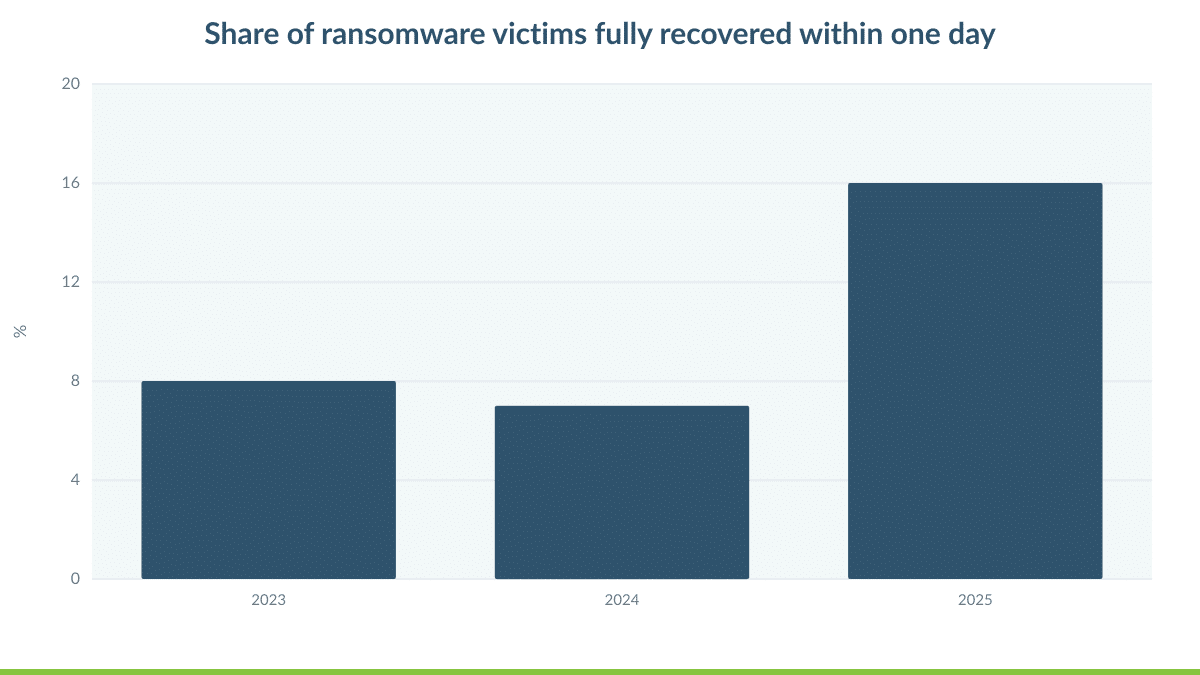
The Sophos data shows that one-day recovery remains the exception rather than the rule. In many incidents, the obstacle is not a lack of backups. More often, one of three things went wrong:
- The attacker could reach the backups.
- The backups had never been restored at scale.
- The recovery process depended on infrastructure that was itself encrypted.
Agile recovery addresses all three.
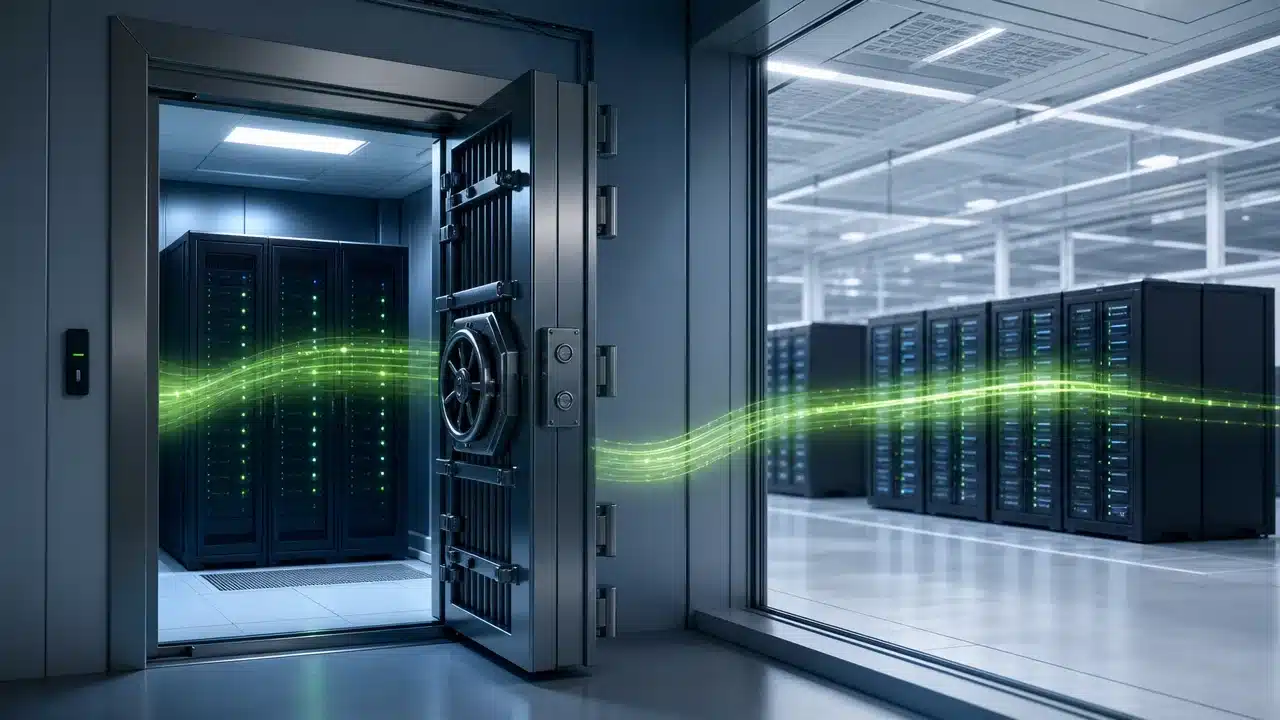
Start with the 3-2-1-1-0 principle that Veeam advocates: three copies of your data, on two different media, with one copy offsite, one copy immutable or air-gapped, and zero errors verified through automated restore testing. Immutability is the critical element. If an attacker with stolen admin credentials can delete or encrypt a backup, that backup is not a recovery option. Veeam hardened repositories and immutable object storage enforce a retention window that cannot be shortened, even by an administrator.
Next, plan where you will recover. Restoring onto infrastructure that was just compromised risks reinfection, and rebuilding that infrastructure takes time you do not have. An isolated recovery environment, provisioned in advance and ready to receive clean workloads, turns recovery from a reconstruction project into a failover.
IT Vortex delivers both halves:
- Backup as a Service (BaaS) provides Veeam-powered, immutable, offsite copies managed under a separate administrative domain. A compromise of your production identities does not reach your recovery points.
- Disaster Recovery (DRaaS) replicates tier-one workloads to VMware-powered infrastructure in IT Vortex data centers. Runbooks bring applications up in the correct order.
The result is not only protected data but also a rehearsed path to running the business again. That is the Resilience pillar in its most practical form.
A backup you have never restored under pressure is a hypothesis, not a recovery plan.
Tip 7: Rehearse, Measure, and Iterate on a Fixed Cadence
The CSO Online feature identifies continuous iteration as a defining trait of agile defense. Iteration requires two things most security programs lack: regular practice and honest measurement.
Practice: Tabletop Exercises and Technical Failover Tests
Tabletop exercises put executives, legal counsel, finance, communications, and IT in the same room. Together they walk through a realistic scenario, such as ransomware on the file servers, a compromised executive mailbox, or a hypervisor-level attack. The goal is to surface decision gaps before those decisions are needed. Who authorizes taking a revenue system offline? Who notifies the insurer? Who speaks to clients? These are leadership questions, and they deserve leadership answers in advance.
Technical failover tests then confirm that recovery actually works. A passing test shows four things:
- Workloads boot in the isolated environment.
- Applications connect to their databases.
- Users can log in.
- The measured recovery time matches the objective you promised the business.
Testing is also where hidden dependencies surface: a licensing server nobody documented, a DNS record that points back to production, or a certificate that expired months ago.
Measurement: The Metrics That Prove Agility
Measurement closes the loop. Track a small set of metrics every quarter:
- Mean time to detect, from first malicious activity to first qualified alert.
- Mean time to contain, from qualified alert to isolation of affected systems.
- Recovery time achieved in testing, compared with the recovery time objective for each tier-one system.
- Percentage of known exploited vulnerabilities fixed within your target window.
- Number of standing privileged accounts, trending toward zero.
Then act on what the numbers show:
- If detection is slow, tune alerting or expand log coverage.
- If containment lags, extend automation.
- If recovery testing misses its objective, fix the runbook and test again.
A structured DR failover validation plan template makes each test repeatable and auditable. Results then improve from quarter to quarter instead of resetting every time a key engineer changes roles.
This cadence separates agility from activity. A program that tests quarterly and adjusts based on evidence becomes measurably faster over a year. A program that tests once, files the report, and moves on stays exactly as fast as it was on the day of the test. The Flexibility pillar depends on this discipline, because you can only adapt an architecture you understand, and you only understand what you have measured.
Where an Integrator Fits in Your Defensive Agility Plan
None of the seven tips requires a single vendor or a single product. They require integration. Identity policy must inform segmentation. Detection must trigger automated containment. Containment must protect backups, and backups must feed a tested recovery environment. Mid-market organizations most often stall at this point. Each tool is purchased and configured in isolation, and nobody owns the seams between them.
IT Vortex works as integrator, architect, and advisor across those seams. IT Vortex designs the architecture with your team, operates the platform layers you choose to hand off, and stays accountable for how the pieces work together. A typical engagement sets clear boundaries of responsibility:
- Your team keeps ownership of business applications and user experience.
- IT Vortex operates the VMware-powered infrastructure, the Veeam-based protection layer, and the managed security stack built on partners including CrowdStrike, Fortinet, Proofpoint, and Microsoft.
- Where secure remote access is the priority, Desktop as a Service (DaaS) delivered on Omnissa technology keeps data in the data center and off unmanaged endpoints.
The pillars map directly to the outcome:
- Simplification: fewer tools and clearer ownership speed every decision.
- Security: zero trust, managed detection, and automated containment shrink the attacker’s window.
- Performance: analysts focus on real threats rather than noise.
- Resilience: immutable backups and tested failover turn a crisis into a recovery exercise.
- Flexibility: the architecture adapts as threats, regulations, and the business change.
Defensive Agility Is Measured in the Gap
It is tempting to treat defensive agility as a maturity score or a product category. It is neither. It is a gap measured in time, and there are two of them. The first is the gap between an attacker’s first move and your first containment action. The second is the gap between the moment systems go down and the moment the business runs again.
The three charts in this article each speak to one of those gaps:
- The Mandiant dwell-time data shows the first gap widening.
- The CrowdStrike breakout data shows how little room attackers leave inside it.
- The Sophos recovery data shows how few organizations close the second gap within a single day.
Defensive agility is not a product you buy. It is the distance between an attacker’s next move and yours, and every control you own should shrink it.
So set aside the question of whether your security stack is complete, and ask two sharper ones. How many minutes does your team need to contain a compromised host at 3 a.m. on a holiday weekend? How many hours does your most important application need to come back from an immutable copy in an isolated environment? If you cannot answer both with evidence from a recent test, that is your starting point. It is a more useful starting point than any new tool.
Pick one gap this quarter. Measure it, shrink it, and test it again. Then pick the next one. Organizations that work this way stop reacting to every headline and start compounding small, measurable improvements into a defense that keeps pace with the people attacking it.
If you want an outside perspective on where your gaps are widest, schedule a working session with Lou Corriero, VP Cloud at IT Vortex. In one conversation, you will map your current detection, response, and recovery timelines against the seven tips above. You will leave with a prioritized plan for closing the gap that carries the most business risk.